
Where do I update the name and logo?
Go to Settings and select Branding. This page manages your store URL, logo, browser favicon, store name, description, business category, and contact details. Palette colors are set under Theme and Visual Identity; do not search there for asset upload controls.
Steps to review branding
- Confirm the active store selection.
- Review store name, logo, and favicon using the provided controls.
- Enter an accurate, concise summary under “About Store”.
- Review business category tags and public social links.
- Save changes within the section, then open your live storefront to verify placement.
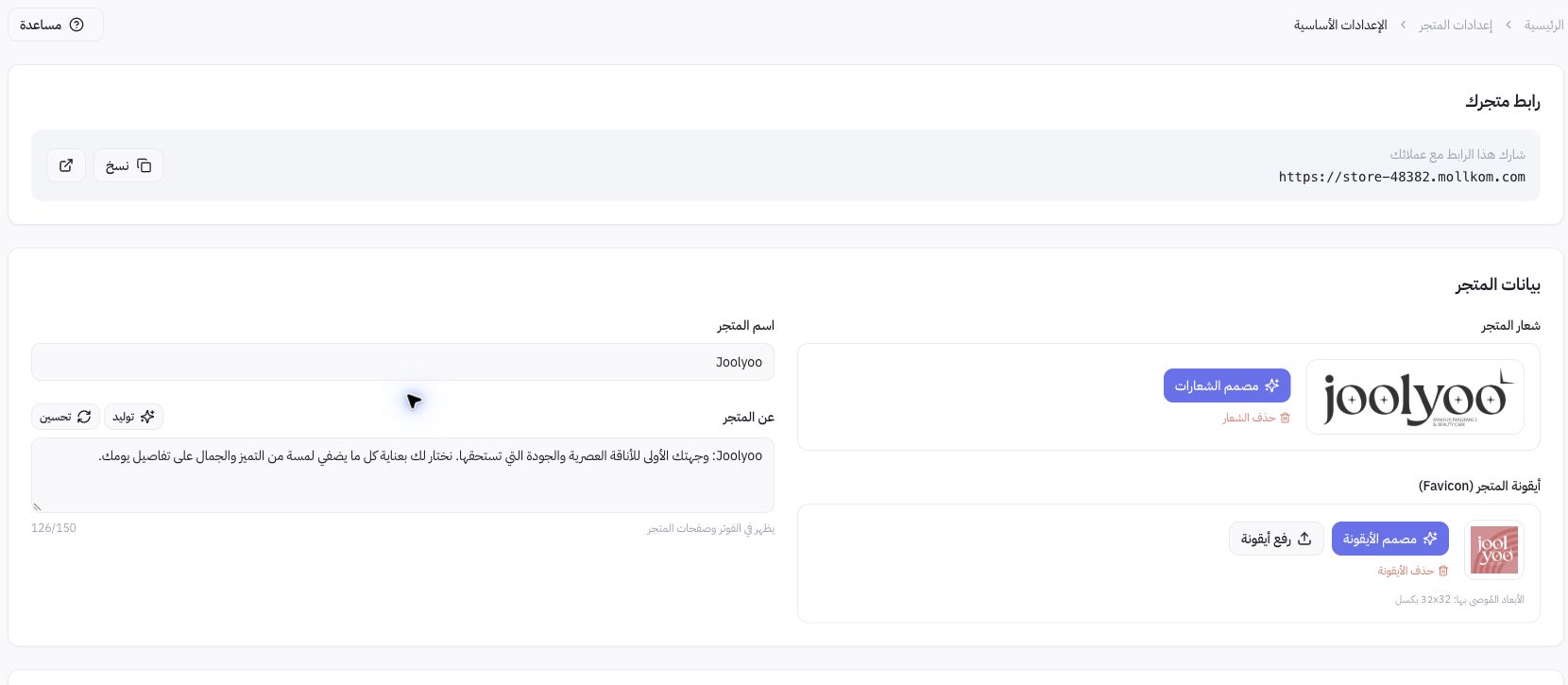
Example from Joolyoo
The screenshot displays Joolyoo's logo, favicon, and bio, separating core identity from layout templates. Changing your name or bio does not publish a new theme design, nor does it update external social media handles automatically.
How do I use AI description generation?
The About Store field provides draft generation and rewriting up to 150 characters. Review and edit the copy before saving. This utility has an independent rate limit; if reached, do not purchase top-up credits or fire repeated requests without review.
How do WhatsApp numbers differ across settings?
The Store Admin WhatsApp number handles administrative notifications and verification; it is separate from customer support channels and WhatsApp Business integrations. Saving a private number here does not confer full admin rights or guarantee immediate enrollment in pilot features. Configure each channel in its designated section.