
Create an AI-powered online store, from product preparation to commerce operations
Mollkom is an integrated commerce operating environment that uses AI for product information and imagery, storefront design, marketing and customer interaction, alongside orders, inventory and delivery. The online store is one channel within this environment. Review AI outputs and the services available to your account before approving them. Mollkom is in pilot launch.
A storefront shaped by your catalog
The smart store manager reviews products and category structure to propose a landing page with sections, copy and banners. Review the proposed design, approve it and publish it. Refresh the presentation as your assortment or campaigns change.
From discovery to a fulfilled order
Product titles, descriptions and images support the buying journey. Orders then connect with stock, preparation and shipping. Available payment and shipping services depend on your business account and the providers you connect.
A starting store or a business with branches
Begin with a focused catalog, or explore how online selling connects to a warehouse and point of sale. Compare plans around the work your team needs to do, including product preparation, marketing and ongoing operations.
Budget for setup and day-to-day operations
Separate the platform plan from your domain, catalog preparation, imagery, marketing and payment or shipping charges. Define the products and channels you will launch, compare plan limits and usage units, and test an order before expanding. The store cost guide below provides a framework rather than a universal price.
What does AI do, and what do you review?
Start with your actual product information and images. Check proposed descriptions and imagery against the originals, then review categories, sections and banners in the automatic designer. A saved design is not proof that the store is published. In marketing, distinguish a plan, a draft, scheduling and actual publication; execution requires connected accounts, permissions and service availability.
A practical example: the Joolyoo store design
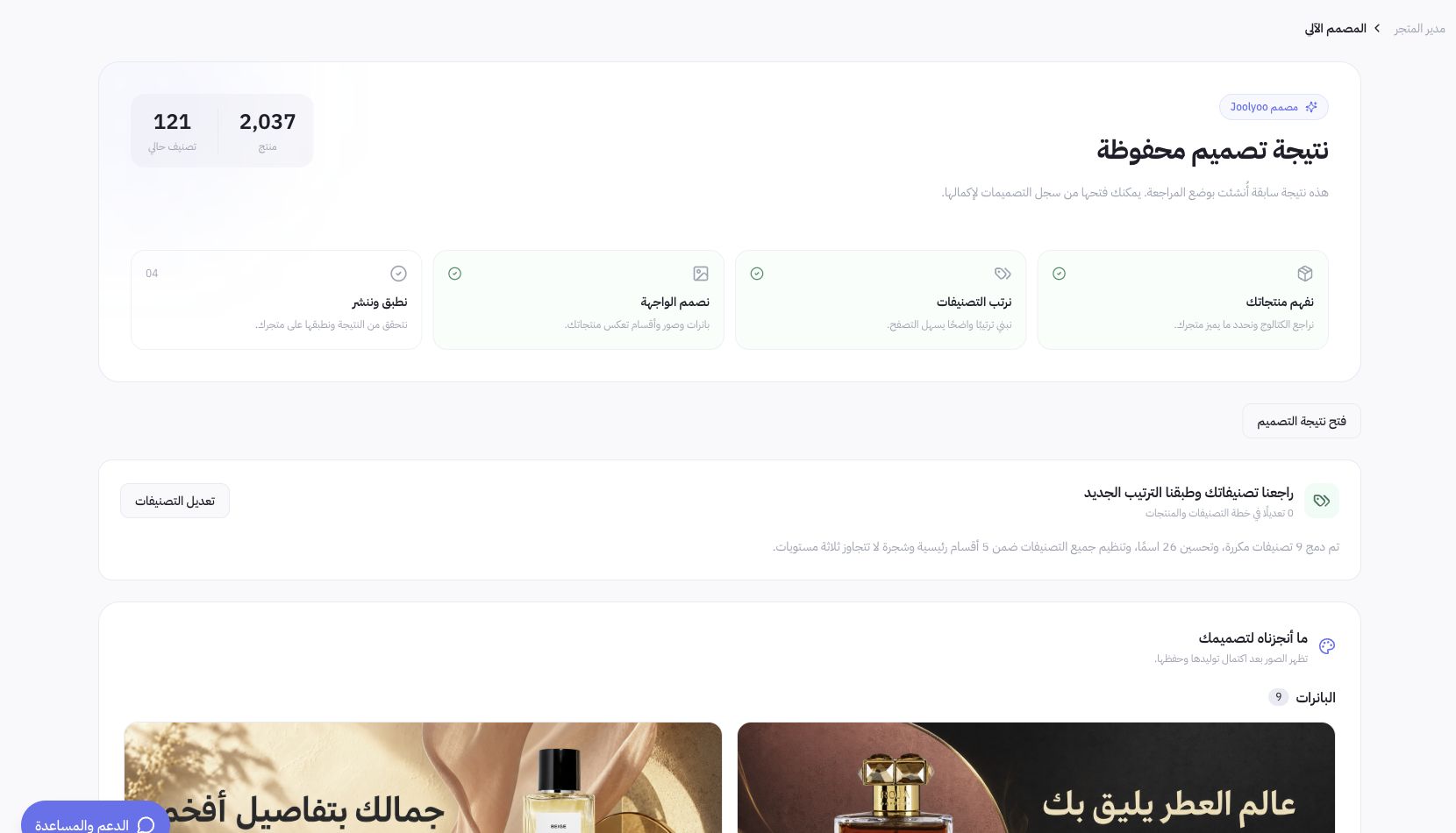
The Arabic screenshot below shows a saved design in Joolyoo, with 2,037 products and 121 categories at the time of documentation. Use it to understand catalog and design review, not as evidence that every result was published or that sales grew. Joolyoo is a pilot store owned by Mollkom, not an independent customer testimonial.
Is Mollkom suitable for your business?
Consider a pilot if you want product preparation, design and marketing connected to orders and inventory in one environment. Before migrating an existing business, verify your required payment gateway, shipping providers, country, language and device. If success depends on a custom integration or a specific mandatory process, request account-specific verification first; a service name or dashboard section does not prove activation.
See the example and follow the practical guide
How the work flows
- 01Add your products and business information
- 02Prepare descriptions, images and categories
- 03Review the storefront and connect services
- 04Publish and follow orders and marketing
Common questions
Is Mollkom only a website builder?
The storefront is one channel in a commerce operating system that includes product preparation, marketing, customer service, inventory, POS, shipping and delivery.
Can I use Arabic and English?
Yes. Prepare storefront and product content in Arabic and English, and review translated product facts before publishing.
How do I select a plan?
Compare product and user limits, operational features and usage units on the pricing pages. Some AI tasks consume usage units.
How do I start an online store with Mollkom?
Register and create your store, add a product sample, and review its data, images and categories. Prepare the storefront, connect suitable services and test the order journey. You can start through registration without submitting a demo-request form.
Do I need coding experience to start the store?
You can begin in the dashboard by adding products and reviewing the design and settings without writing code for those steps. Special requirements and custom integrations need separate assessment. Follow the store-opening guide and check payment and shipping before launch.
Guides for choosing and operating your setup
Online store cost in Saudi Arabia: plan your launch budget
Plan online store setup and running costs: platform plans, domains, product preparation, payments, shipping and marketing, with an illustrative budget calculation.
How do you choose the best AI ecommerce platform for your store?
A merchant guide to choosing an AI commerce platform: compare execution, costs, payments, shipping and inventory, then validate a sample before migrating.
More for your store
Does your store need a custom domain, and when should you connect it?
Start with a working link and a ready store, and choose a custom domain when you need a permanent address for your brand. An example from the Joolyoo domain and decision steps that preserve email and links before activation.
How do you organize store categories so customers can find products?
Build a category tree based on how the customer searches for the product, then review category names, links, and products within each section. A real example from Joolyoo and a plan to arrange the catalog without duplication or arbitrary deletion.
How do you design an online storefront interface that makes finding and buying products effortless?
Start with intuitive categories, crisp imagery, and distinct product titles, then audit product detail pages and checkout on mobile.
Connect the next step
Turn product information into a ready catalog
Create product titles, descriptions, marketing copy and SEO fields with AI. Mollkom connects catalog content with product images, marketing and customer service.
Connect orders, inventory and warehouse operations
Manage ecommerce orders, inventory, warehouses and point of sale with Mollkom. Connect digital selling, product records, fulfillment and delivery.
Mollkom is in pilot launch. Select the operational scope and services that fit your business.