
Where can I review payment methods?
Go to Settings and select Payment Methods. The view displays available options based on your store's country and entity setup, covering core gateways, buy-now-pay-later services, and custom methods. The presence of a provider logo does not mean all features are active for your store.
Steps to configure a payment gateway
- Confirm the required operating country, settlement currency, and payment method.
- Open the gateway settings using an Owner or Admin account.
- Enter API credentials only into secure platform fields, confirming provider account status and test/live modes.
- Check the validation response and processing eligibility message.
- Enable the payment method once authorized, then verify its checkout availability and display terms.
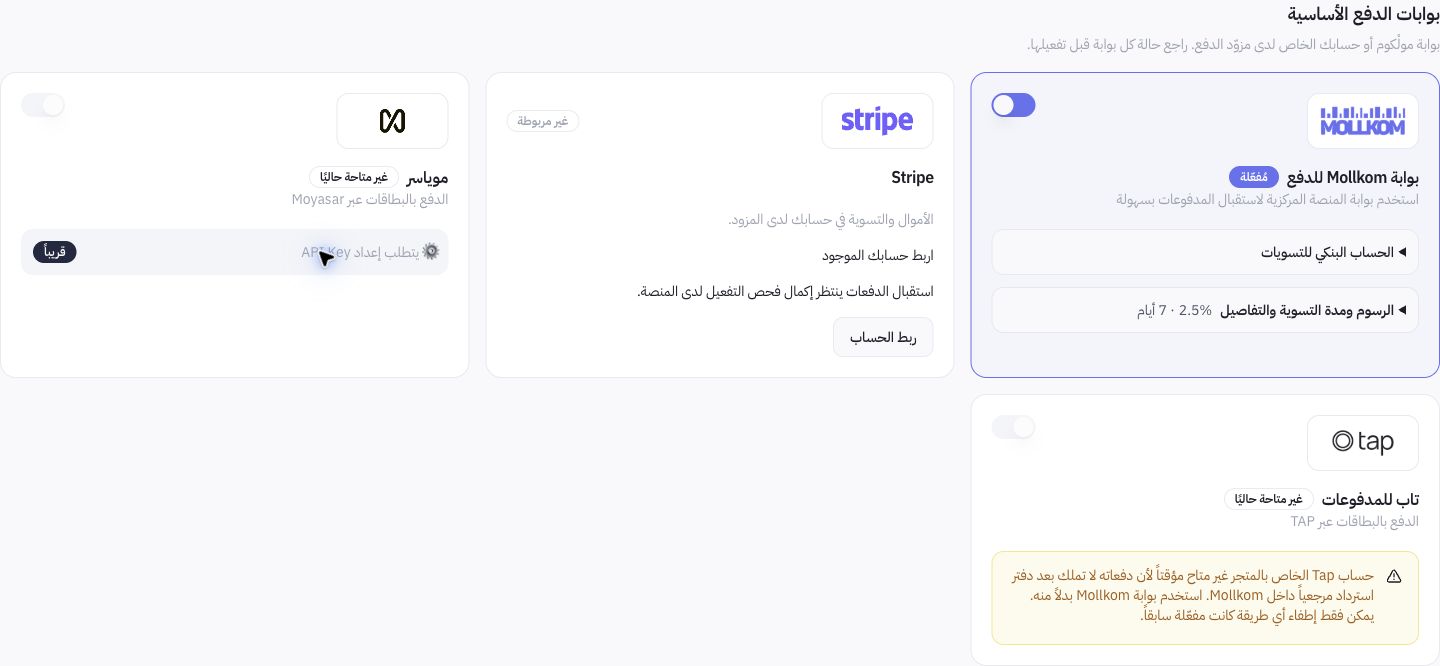
Example from Joolyoo
The Mollkom gateway appeared active, whereas certain providers remained unavailable or pending verification. Test modes may also be present. The dashboard screenshot does not guarantee universal card or installment acceptance across all stores.
What does a successful gateway connection not guarantee?
A valid API key confirms credential connectivity, but it does not guarantee checkout authorizations, automatic refunds, bank payouts, or domain approvals. Payouts in your direct merchant account differ from Mollkom managed gateway settlements. Monitor status across each channel individually.
How should I handle payment failures?
Review transaction reference and status before retrying, especially when processing state is indeterminate. Never share secret API keys, card numbers, CVV codes, or OTPs in chat. Use designated credential forms and request log verification from support if records differ.