
When should I use a coupon code?
Navigate to Promotions & Loyalty, then select Coupons. Coupons are ideal for promotions where shoppers enter a specific promo code under set qualifying rules. Keep coupon codes distinct from loyalty tiers or automatic promotions; each pathway maintains separate settings, and overlapping rules can yield unexpected checkout totals.
Steps to Create a Coupon
- Open the coupon creation form and enter your coupon code along with an internal reference name.
- Choose between a percentage or fixed-amount discount and enter the value.
- Configure your minimum order spend and maximum discount cap.
- Set total usage limits, per-customer limits, and the active validity window.
- Apply the coupon across all products or select specific items, then verify the active toggle before saving.
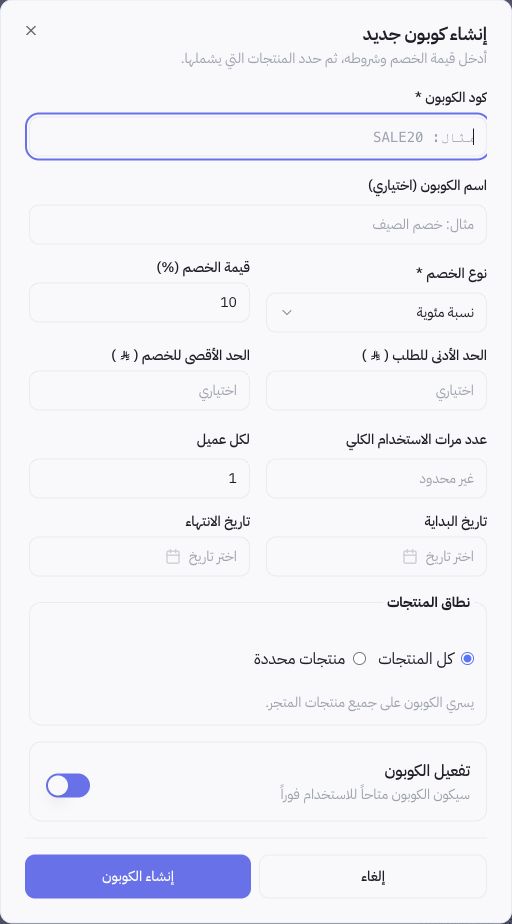
Configurable Demonstration Example
To offer a 10% discount capped at 30 in your store currency, you must configure both the percentage field and the maximum discount cap simultaneously. These figures serve purely as illustrative examples and do not constitute an active offer in Joolyoo. Always state promo terms clearly in your marketing assets so customers do not discover restrictions unexpectedly at checkout.
How do I test coupon redemption?
Test both a qualifying cart and a non-qualifying cart without completing an unintentional live order. Verify the calculated discount amount, minimum spend requirements, eligible products, and promotion dates. Applying a coupon code to a cart does not register completed redemption or guarantee finalized payment.
Why is the store rejecting a coupon code?
Check code spelling, active status toggles, start and expiration dates, cart thresholds, and eligible product restrictions. Check previous customer redemptions if a per-customer limit is enforced. Never troubleshoot a rejection simply by opening the discount to your entire catalog without identifying the underlying constraint.