
How do I access fulfillment tasks?
Open Delivery & Drivers under Operations. This page brings together delivery orders, your driver team, cash custody, delivery returns, and settings. Start with orders that need driver assignment, then monitor active deliveries and fulfillment history.
Steps to track an order
- Check the section for orders needing assignment.
- Search for the order or filter by status in the delivery list.
- Open the order to verify fulfillment details and the assigned driver.
- Track acceptance, pickup, dispatch, and final outcome against the recorded status.
- If a return or cash collection occurs, open its dedicated section rather than assuming it finished with delivery.
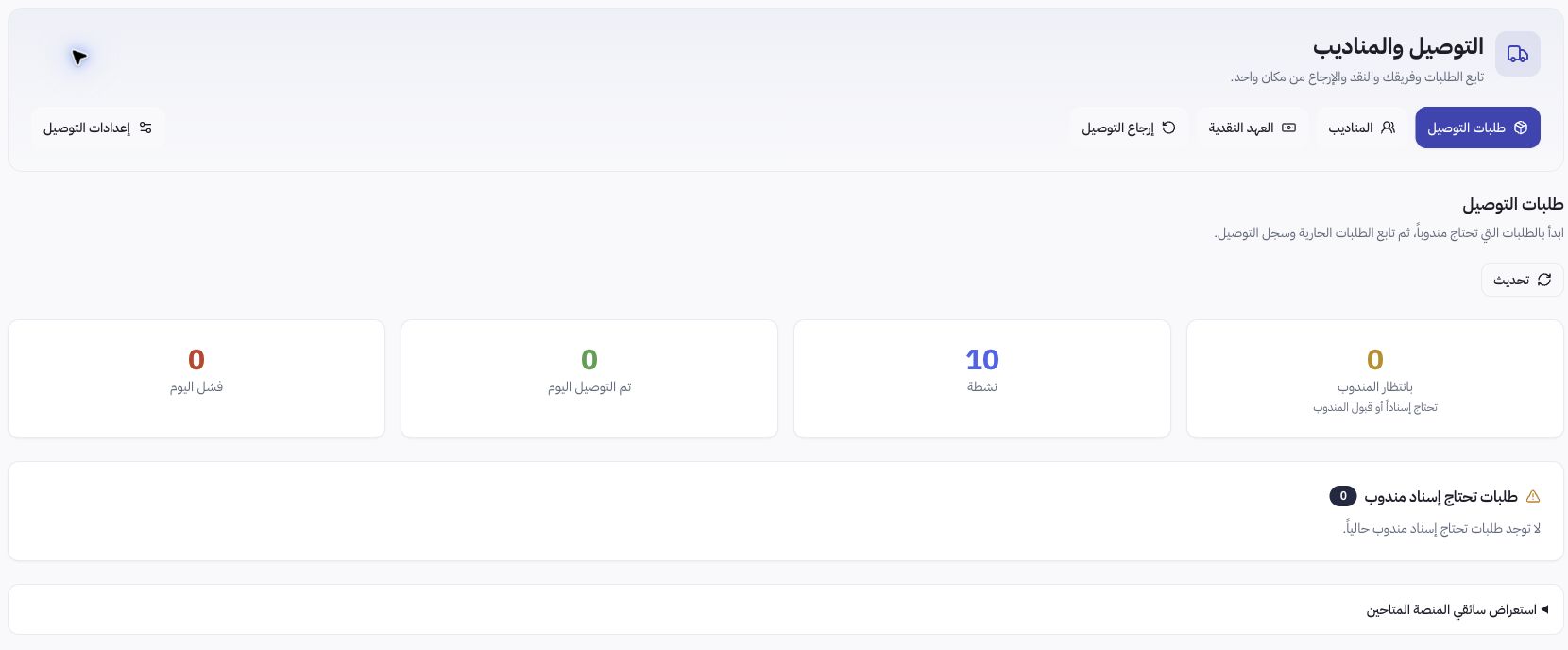
Example from Joolyoo
The page displayed active orders even while showing zero unassigned orders at the top of the screen. A zero on the pending card does not mean all orders have been delivered. Always check the specific order status and its current stage.
How do I separate cash collection from delivery?
Driver assignment, acceptance, delivery, cash collection, and custody reconciliation are distinct stages. Do not rely on successful delivery alone as proof that collected funds reached the store. Electronic payments and bank reconciliations are audited in Payments, while physical cash custody is tracked in Delivery.
What should I do when an order stalls?
Review the order reference, status message, and previous attempt before reassigning. Do not mark an order as delivered or collected without operational proof. When contacting support, provide the reference ID and a description of the issue, and avoid sharing screenshots containing customer addresses or phone numbers.