
Start with the Core Metric Question
Go to Marketing, then select Results. Determine whether you are analyzing content impressions, click volume, or attributed orders. These represent distinct metrics: higher click volume alone does not prove increased sales, and unavailable ad spend reporting does not indicate zero campaign cost.
Steps to Read the Performance Report
- Select a 7-, 30-, or 90-day window based on your analysis objective.
- Confirm the active timezone displayed.
- Filter by a specific campaign or select all campaigns.
- Review the high-level summary, comparison views, and measurement health indicators.
- Reconcile attributed orders against report definitions before using figures for budgeting decisions.
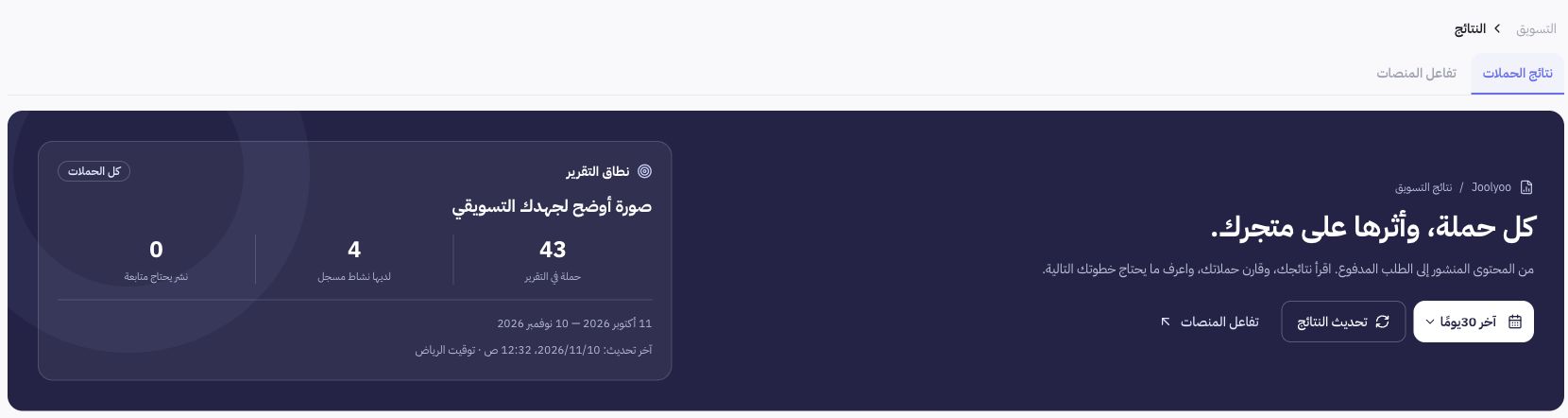
Dashboard Example
Joolyoo allows adjusting reporting periods and campaign filters directly from the top bar. To compare two campaigns fairly, maintain the exact same date range and attribution definitions. Variations in timeframes or reporting cutoffs can explain numerical differences without indicating errors in order tracking.
How are sales and clicks calculated?
Attributed sales in this report correspond exclusively to paid, non-canceled orders that match the attribution criteria. Click counts do not necessarily represent unique individuals, and published post metrics depend on successful publication confirmations. Avoid aggregating these distinct counts as if they represent identical stages for every visitor.
What should I do if performance data is incomplete?
Open Measurement Quality and inspect your tracking links, campaign mapping, channel accounts, and reporting date ranges. Document missing data as unavailable rather than zero. Verify reference orders against their actual fulfillment status without running mock purchases disguised as real customer conversions.