
What is the difference between Account and Storefront?
Account details belong to the account owner, business entity, and billing profile, whereas storefront branding defines the public-facing name, logo, bio, and customer contact channels. Go to Settings, then Account, whenever you need to review account owner information.
Steps to Update Details
- Review personal details: photo, full name, and mobile number.
- Complete any available business information.
- Check the billing address: city, region, postal code, and country.
- Verify the accuracy of information used for billing or domain registrations.
- Save your changes and confirm they persist when returning to the page.
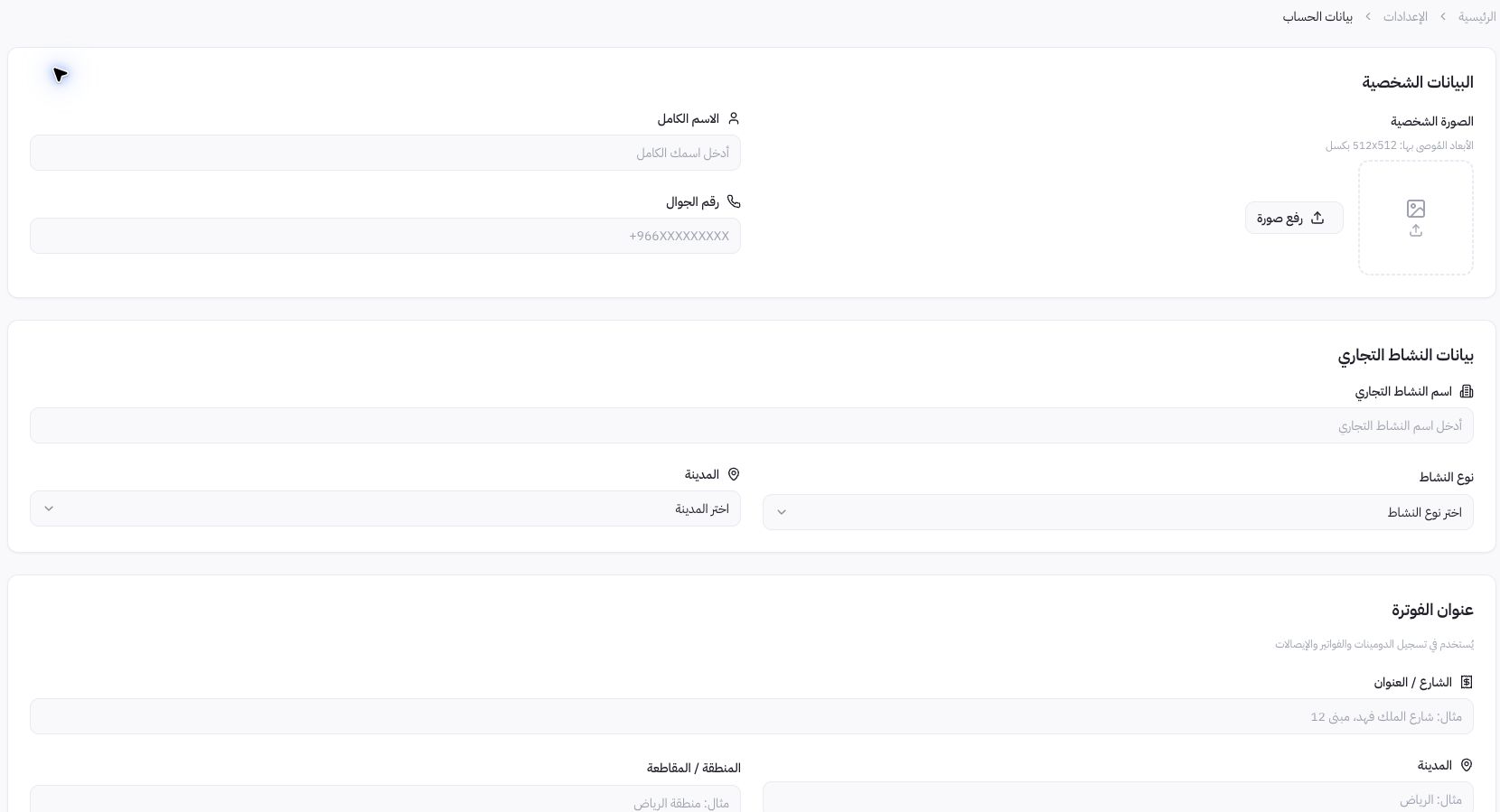
Dashboard Example
The screenshot displays empty fields to show the layout without exposing the owner's email. This example illustrates field locations and does not suggest using placeholder data on a live account. Enter your genuine business information when completing these steps.
Where do I find security settings?
The path documented here is Account Details; no separate menu titled Security or password reset was verified inside this view. If you experience login issues or suspect unauthorized access, use the official account path or contact support rather than assuming an unlisted control exists.
What should I avoid doing?
Never share passwords, recovery codes, or verification tokens with support. Account deletion is an irreversible action, not a way to fix a name or address typo. Review any deletion request and its full operational impact before proceeding with account closure.