
Where are these settings located?
Go to Settings, then open Advanced or Search Engines under Accounts & Integrations. This page aggregates your sitemap URL, search engine verification tags, indexing rules, and title/description templates. Well-structured titles clarify page relevance but do not guarantee specific search rankings.
Verification steps
- Copy the sitemap URL shown for your store and submit it in your authorized Search Console account.
- Inspect sitemap status and error logs rather than relying solely on link presence.
- Review rules for product inclusion, image sitemaps, and indexing preferences.
- Select a live product to preview title and meta description templates.
- Save changes, then inspect the live public page and generated search engine tags.
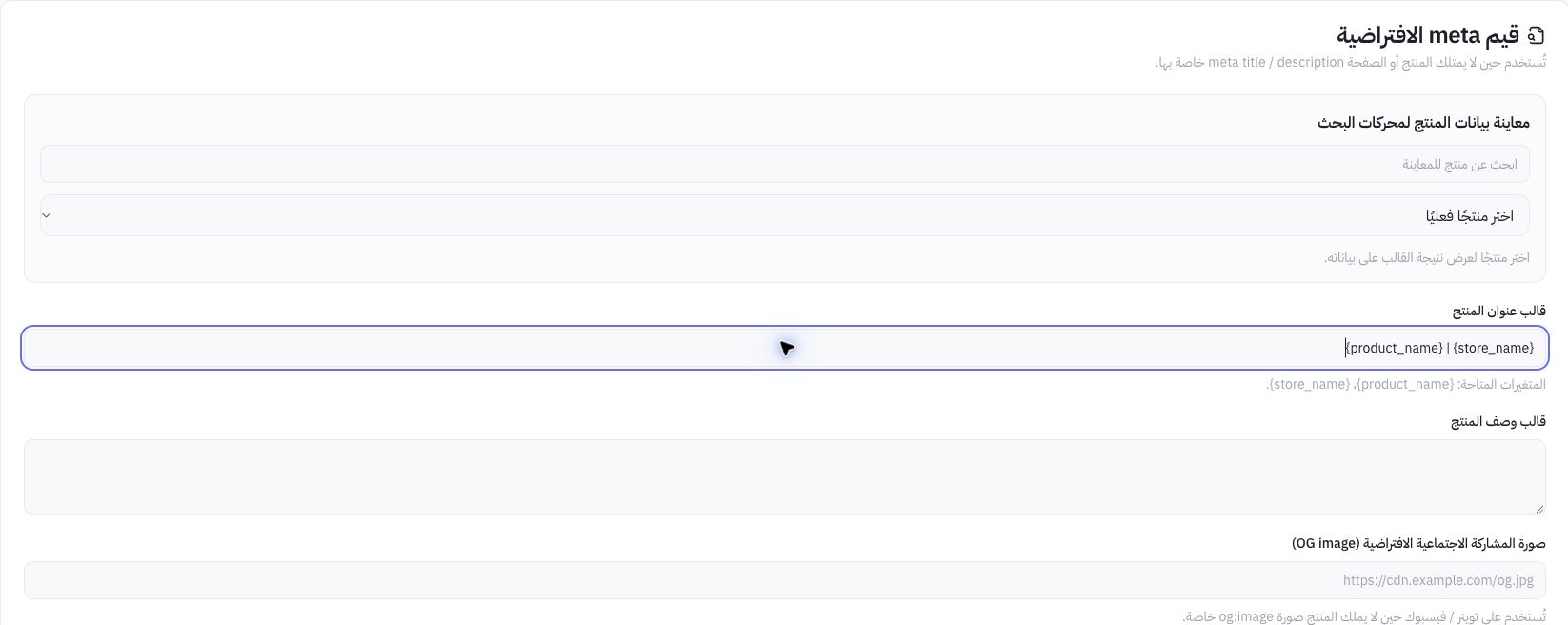
Example from Joolyoo's template
The field contains a dynamic template with {product_name} and {store_name}. Keep variable placeholders intact; the system automatically replaces them with actual product and store names. Use titles that accurately describe the specific product rather than repeating generic keywords across every page.
What is the difference between crawling and indexing?
Submitting a sitemap or allowing crawlers does not prove that a page has been indexed. Blocking crawler access or deleting a sitemap does not instantly remove indexed pages; check the active noindex tag when restricting indexing. Configuring AI crawler access is separate from guaranteeing citation in conversational assistants.
How do I troubleshoot sitemap errors?
If a loading error appears, retry before altering settings. During testing, this section required a reload and showed validation warnings; unconfirmed indexing success should never be assumed. Record the page URL and error timestamp, and monitor indexing in your analytics source.