
Where do I find sales channels?
Open Gateways & Sales Channels from the navigation menu. This screen centralizes platform catalogs, marketplaces, and delivery networks. Your online storefront, POS, and social publishing channels operate independently, and product eligibility criteria can vary across them.
Channel Evaluation Steps
- Open the card for your intended channel.
- Check its status: Connected, Setup Required, In Development, or Feed Ready.
- Review account, regional, and product requirements for that specific pathway.
- Check the sync log or channel diagnostics when available.
- Verify catalog approval and listing status directly with the external provider before treating the channel as operational.
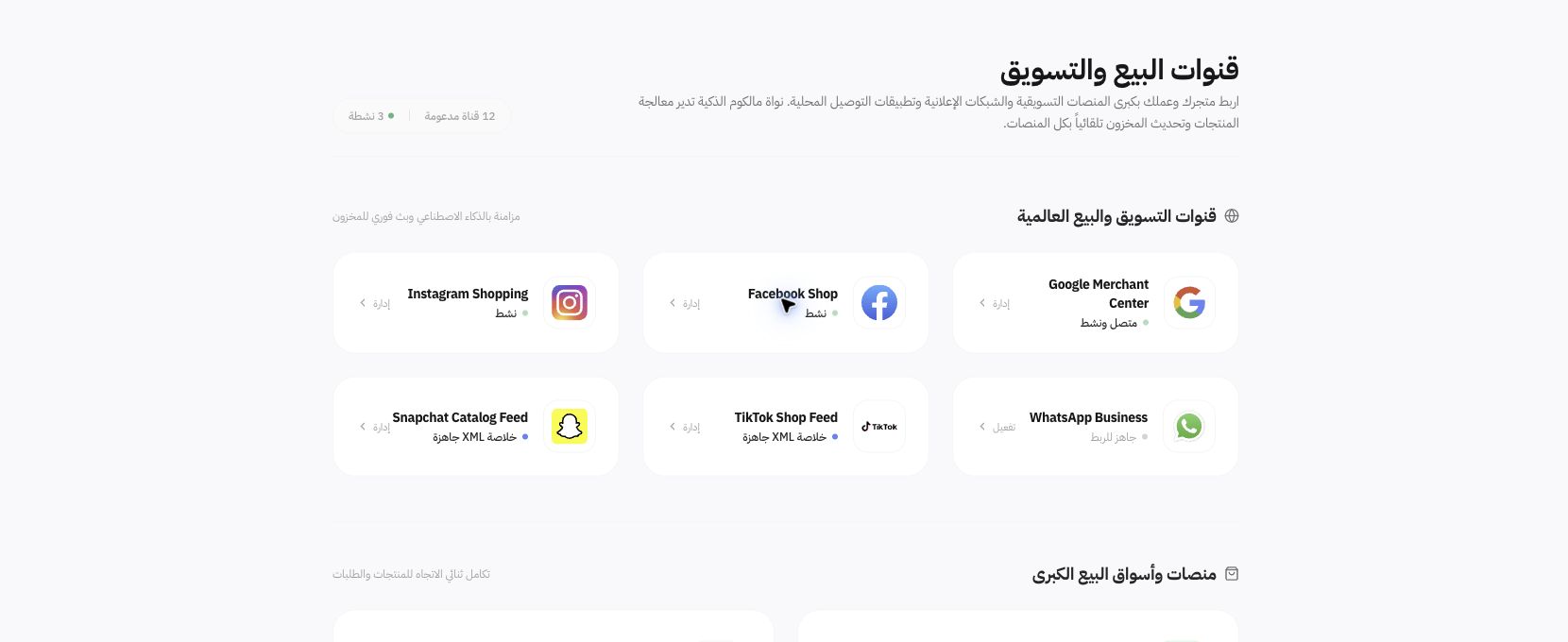
Example from Joolyoo
Google Merchant Center and other channels show varying states, while Amazon and Noon appear under development. A general sync overview at the top of the page does not indicate that every channel is operational. Focus on your active integration and confirmed account data.
What does XML Feed Ready mean?
A feed is a structured catalog URL configured for import into a third-party platform. It does not automatically guarantee product approval, active ad serving, or incoming orders. Verify language, currency, landing URLs, prices, stock availability, and the import status within the receiving platform.
How do I choose the next step?
For social publishing, open Connected Accounts. To review your Google catalog, open its dedicated card and check item diagnostics. If a channel is under development, do not advertise it to customers. If sync discrepancies occur, inspect the product, timestamp, and log results rather than expecting immediate real-time broadcast.