
Start with a specific warehouse, item, and unit, then compare your physical count against logged movements before approving any adjustment. Here is a practical approach to understanding inventory discrepancies and linking them to sales, transfers, and returns.
What Is the Short Answer?
An inventory count compares a counted quantity at a specific location and time against the recorded balance for that same item. When a discrepancy appears, recount and review sales, receipts, transfers, returns, and units of measure, then post a justified adjustment through the designated path. Adjusting the number just to match shelf stock without knowing the cause can hide an error that recurs on the very next order.
How Do You Scope an Inventory Count Before Starting?
Select a designated warehouse and a reviewable group of products. Log the count start time and who performs it, and determine how you will handle movements during it: pause handling in the counted area for an appropriate period, or record every subsequent movement to reconcile back to that same moment. Never compare a morning count to a balance that changed after evening sales.
Separate sales units from supply cartons, and verify the item and variant barcodes. Two identical-looking packages of different sizes are not the same product. Likewise, damaged goods or customer returns undergoing inspection may be physically present but unavailable for sale; record their status rather than adding them directly to available inventory.
What Does Mollkom's Actual Screen Show?
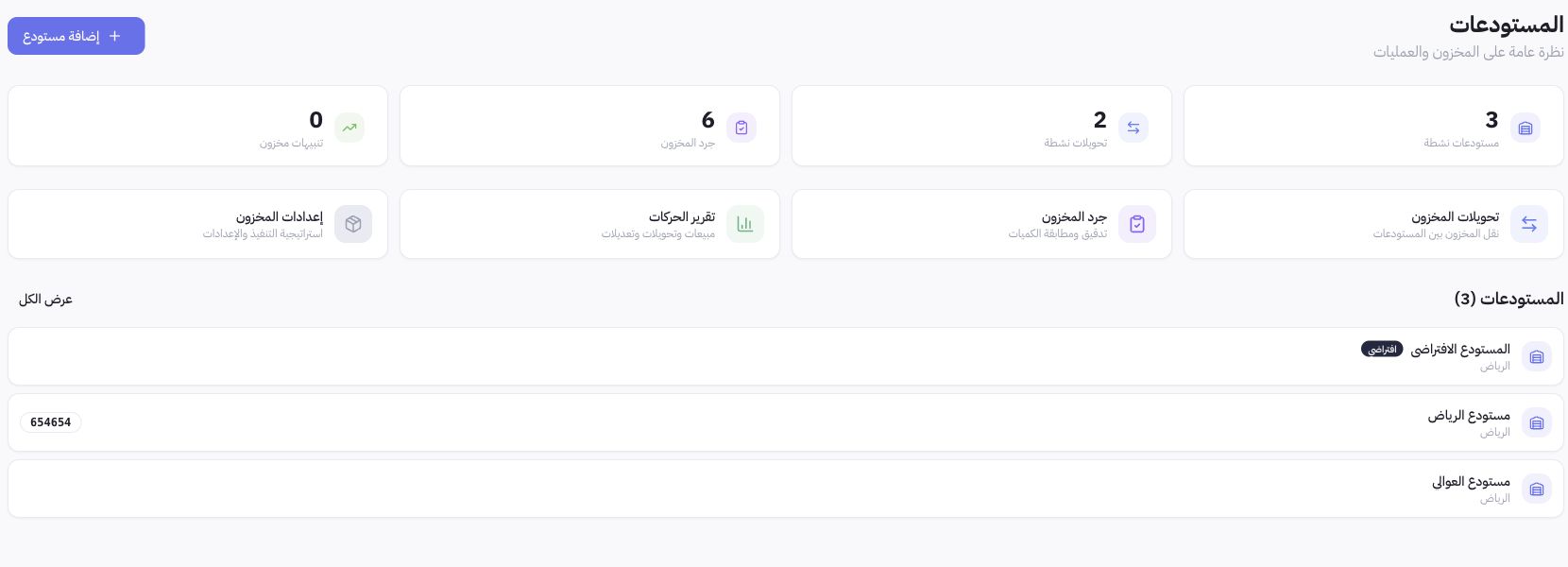
Joolyoo displays distinct storage locations and independent paths for transfers, counts, and movements. Start from the target warehouse, then trace the operation and its reference. Seeing a transfer listed does not prove it was received at the other warehouse, and opening the count screen does not mean a quantity difference was approved. The warehouse guide below explains where to find these tools and the verification steps.
How Do You Investigate a Discrepancy Step by Step?
- Confirm the item identity, barcode, unit, and warehouse, then recount without copying the expected balance.
- Review orders, fulfillment status, and movements during the period, not the number of orders alone.
- Examine inbound and outbound transfers, receiving status, and any returns not yet fully inspected.
- Record the discrepancy reason and its evidence, then review the adjustment procedure and required permission before approving it.
- After approval, open the movement log and balance again to verify that the correction was executed once and in the correct location.
What Does an Inventory Discrepancy Example Look Like?
An educational accounting example, not actual Joolyoo sales data: The recorded balance is 24 units, and the physical count is 22, so the initial difference equals -2. If you find two unrecorded outgoing movements, process their correct reference instead of creating a manual shortage and then recording the outgoing movement a second time. If you do not find a reason, keep the discrepancy documented for review and do not invent a purchase or sales movement to conceal it.
Use a simple log for each review: item name, barcode, warehouse, unit, count time, balance at comparison, counted quantity, difference, reason, movement reference, and reviewer name. This is a suggested working checklist; not a claim that every field appears in a single form within the platform.
Do You Need to Count Your Entire Store Every Time?
You can organize periodic counts for smaller groups based on product movement, value, and variance recurrence, with comprehensive counts conducted when needed. Choose the cadence from your own activity data rather than a fixed schedule for all. If shortages recur in items sold through the cashier and online store, review the warehouse linked to each channel before increasing the counting frequency.
How Do You Know the Problem Is Resolved?
Check the balance and movement log, then monitor a subsequent operational cycle. Matching balances for a single moment does not prove the cause has ended. Track the number of recurring discrepancies and their causes, and do not consider a balance decrease resulting from a count as automatic proof of theft or lost sales.
How Do You Get Started in Mollkom?
Set up your catalog and storage locations, then follow the linked warehouse and inventory settings guides below. Mollkom gathers products, orders, inventory, POS, and delivery in a single operational environment; start with a small scope that can be reviewed before expanding operations.
