

Maintain a single master record per product and variant, calculating available-to-promise stock after deducting allocations, damaged items, and in-transit transfers. Test concurrent checkouts of the last remaining unit across both retail and online channels, and verify that canceled or returned orders restore inventory back into the appropriate status.
How to interpret inventory screens without confusing balances
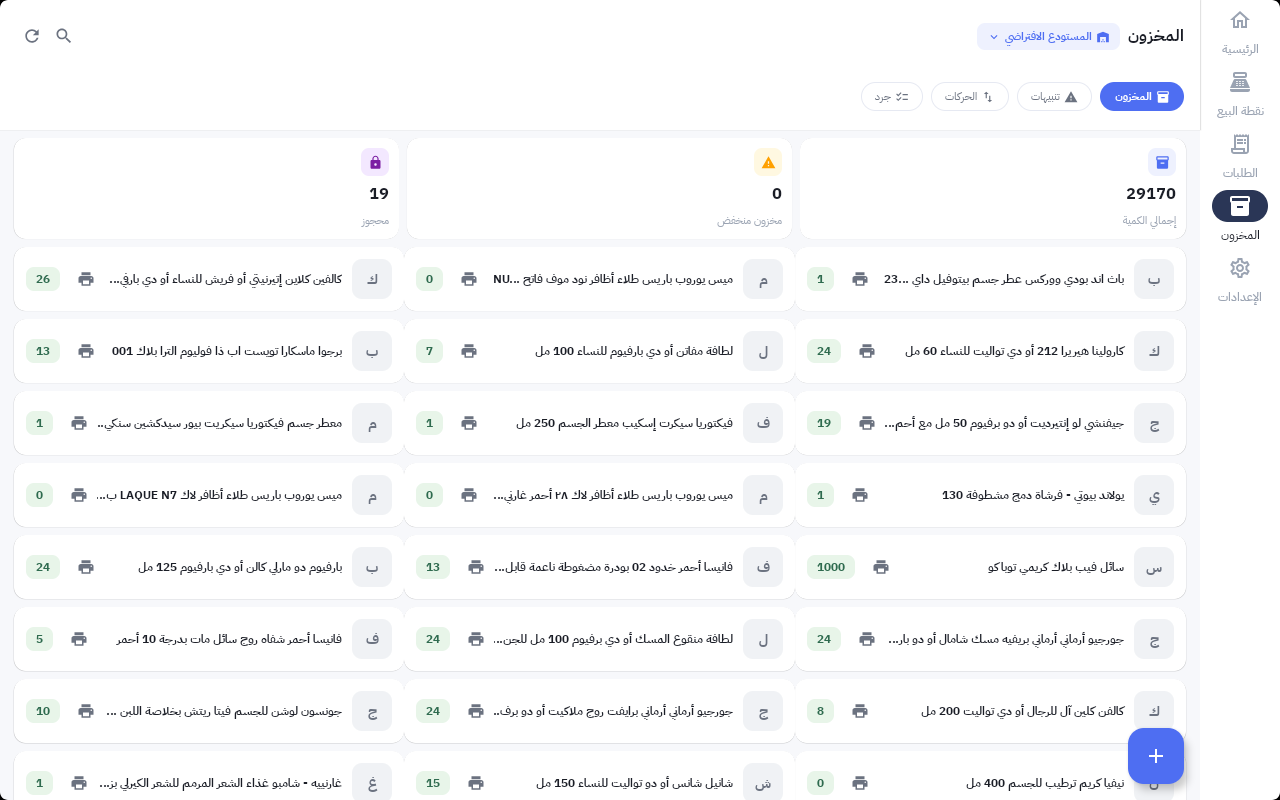
In Mollkom's production inventory screen, you can see the warehouse dropdown, total quantity metric, reserved stock counter, and SKU cards. For instance, an aggregate stock of 29170 alongside 19 reserved units is shown in this historical capture. These figures reflect the pilot store environment at the time of documentation, not live counts or historical order totals.
Do not simply subtract aggregate figures to determine sellable stock for a specific SKU. Accurate decisions require evaluating the exact product variant, warehouse location, reservation status, and your business's operating rules. Start with the SKU's item ledger to inspect the exact transaction driving the change.
- Designate the POS location's fulfillment warehouse and ensure that SKU variants correspond identically to online catalog listings.
- Check available stock and active reservations prior to ordering, then verify the impact of an approved order or completed checkout.
- Track order cancellations, product returns, and inter-warehouse transfers as distinct events. Never release an inventory hold simply because a shopper exited a checkout session.
- Use the Movements tab to trace stock discrepancies, and run the Cycle Count tab to reconcile physical inventory against recorded figures within role-based access limits.
Maintain an integration test log detailing: SKU, warehouse, triggering event, beginning and ending balances, and expected outcome. A granular test record is far more dependable than assuming sync is working, helping you surface overselling risks or orphaned holds early.
What does truly available inventory mean?
On-hand stock does not always equal your available-to-promise quantity. Deduct active reservations, damaged goods, and quarantined items, while tracking incoming shipments and transfers under their proper statuses. Align SKU identifiers and variant parameters between storefront and POS; similar item names alone are never enough to synchronize stock.
How do you implement this step by step?
- Define explicit inventory statuses
Differentiate between physical on-hand, available-to-promise, reserved, damaged, returns under inspection, and in-transit inventory. Never permit ambiguous statuses like "in transit" to inflate balances across multiple warehouse locations simultaneously.
- Map out the lifecycle event sequence
Document the entire process from the moment a product is scanned or payment begins through to order completion or hold release, including handling network interruptions, payment failures, and cancellations.
- Define your availability policy
Segment SKUs and retail locations into pooled stock, hybrid fulfillment, or reserved channel allocations based on record integrity, sync latency windows, and sales velocity.
- Configure reservations and buffer thresholds
Implement atomic, time-bound reservation holds. Size safety stock buffers according to anticipated sales volume across your sync latency window, round up to whole units, and review parameters weekly.
- Establish an active exception watchlist
Track negative balances, expired reservations, overdue transfers, and out-of-stock fulfillment cancellations. Prioritize high-velocity SKUs and items with the greatest impact on checkout conversion.
Example decision rationale
Example scenario: Only 1 unit of a specific size remains. If a POS sale and an online order initiate at the exact same moment, your reservation logic must prevent the system from committing that single unit twice. Also test what happens if the initial checkout session times out, confirming that the unit returns to available stock immediately.
Is basic numerical synchronization enough?
You also need explicit event definitions, permissions, and robust handling for network failures or payment drops. Clarify with your platform team when reservation holds trigger and clear, and test scenarios within your live setup; never assume all channels handle state changes identically.
Related questions for your next step
How to Connect POS Cashiers to Your Online Store, Barcodes, and Live Inventory
What is the best next step?
Begin by structuring your product catalog and inventory controls. Use the reference workflow above to audit your data and operations, then explore the setup suited to your stage.
Explore the solution on Mollkom · Organize your products and centralize your inventory